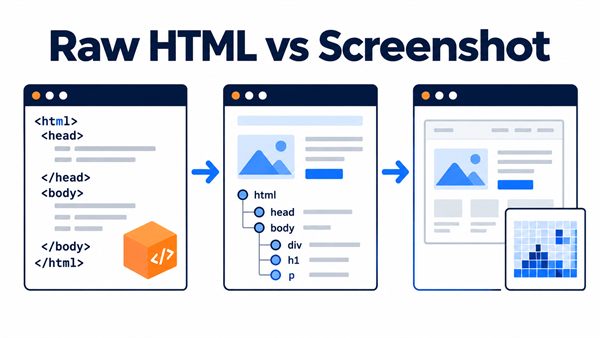

You request a product listing with a normal HTTP client and receive a short document containing only <div id="app"></div>. Open that same URL in a browser and there are 24 products, prices, and pagination controls. It is tempting to replace the parser or add sleep(10), but neither action explains where the missing data came from.
In one common case, View Source still contains no products, while Chrome DevTools shows a Fetch/XHR response whose JSON contains the product IDs and prices. Calling that allowed endpoint and checking its response is simpler than rendering a browser for every listing. In another case, a location selector or scroll creates browser state that the request needs; rendering makes sense there, but a fixed delay still does not show that the data has arrived.
This guide follows that investigation: find where the data appears, use the simplest way to retrieve it, wait until the page shows enough data, and check the result before parsing it.
Only collect data you are authorized to access. Respect the target site’s terms, applicable law, and reasonable request rates.
1. Locate the data before choosing a tool
Start by fetching the URL with your ordinary HTTP client, then open the same URL in a browser. Compare what each step actually returns.
- Search the raw response body for a value that is visible in the browser, such as a product title or identifier.
- Check
View Sourceand inline scripts for serialized application state. - In the browser Network panel, filter to Fetch/XHR and look for a response that contains that value.
- Repeat the action that reveals the data—scrolling, changing a location, or opening a tab—and observe which request or DOM change follows.
Chrome DevTools can preserve network logs across reloads and copy a captured request as Fetch or cURL. The Network panel helps you inspect an endpoint you are allowed to call. Do not copy, store, or share cookies, authorization headers, or other credentials from a browser session.
The initial response usually fits one of these patterns:
| Rendering pattern | What you may find first | Use this path when | Do not start here when |
|---|---|---|---|
| Server-side rendering (SSR) | The fields are already in HTML | The response has the values you need | The response is only a shell or misses target records |
| Hydration | HTML plus serialized state and JavaScript | The embedded state has the fields and a stable shape | The state is partial or only identifies a later request |
| Client-side rendering (CSR) | A root container and script bundles | An allowed Fetch/XHR response has the data, or scripts must run | You have not yet checked raw HTML and the data request |
| Lazy loading | Initial records only | A scroll or interaction brings in more records | The list is already complete |
You do not need to identify the framework perfectly. You only need to find where the fields become available. A selector cannot extract data that a plain HTTP client never received.
2. Choose the simplest way to get the fields
Once you know the source, use the simplest method that returns the fields you need.
Parse raw HTML or embedded state
Use a normal request when the target title, price, or record identifiers are already in the response. Parse stable semantic markers where possible. If an inline script contains serialized state, decode it only after checking the keys and types you expect; framework conventions and script-tag names are not a contract.
This works well for server-rendered pages and pages hydrated with all their data. If the browser sends another request before the fields appear, inspect that request instead.
Call an allowed data request
When Fetch/XHR returns the records you need, a direct request is often easier to maintain than scraping a rendered DOM. Note the inputs that change the response—pagination, locale, or selected location—and write down what a good response contains: status, keys, item type, and a minimum record count.
A browser making a request does not grant permission to reuse it. Use only endpoints, headers, locale settings, and cookies you are authorized to use.
Render only when browser state is required
Use JavaScript rendering when scripts create the only usable version of the page, or when an interaction produces state you cannot obtain through an allowed request. For example, a location selector may change both the displayed price and the request parameters, or an infinite list may request more records only after a viewport event.
Rendering adds timing problems of its own. Navigation may finish before the location change does, and later-loaded items may still be absent from the DOM. Decide which visible fields show that the page is ready before starting the render.
3. Wait for evidence, not an arbitrary delay
Fixed waits make a fast page slower and a slow page flaky. More importantly, they hide the event on which the extraction depends.
Choose a ready-to-extract check tied to the data you will parse. A product detail page can be ready when its canonical URL, title, and current price are all present. A listing can be ready when its list container has at least one item with a stable ID. After changing a location, wait for the loading indicator to disappear and the displayed result count to change.
For browser automation, Playwright locators wait and retry automatically. Wait for the list to meet your check before enumerating it: locator.all() returns whatever is present at that moment, which is risky while a dynamic list is still changing.
Treat networkidle as an extra signal, not proof that the page is ready to parse. Analytics, long polling, and background refreshes can keep a page active after the target data arrives. A quiet network also says nothing about whether the correct price or record was rendered.
4. Common failure points after rendering starts
Scroll with a bound and a purpose
For viewport-triggered content, scroll a fixed amount each time. After every step, check whether new record IDs appeared, an end-of-list marker is visible, or the target count is reached. Set a maximum number of steps and a timeout; “scroll until nothing changes” can hang on pages that continually refresh. The Intersection Observer API often drives this behavior.
Send only necessary request context
Locale, language, and session state can change the result. When an API supports custom headers or cookies, send only the values the request needs and that you are allowed to use. Never put reusable session cookies, account credentials, or API keys in source code, logs, or support material.
Separate timeout from incompleteness
A timeout should cover navigation, rendering, and the ready-to-extract check. Keep a timeout separate from a response that arrived without the fields you need. The first can point to a slow dependency; the second can point to a changed page flow or parser rule.
Retry only transient outcomes
Use a small, bounded exponential backoff for failures that may recover. For Web Unblocker requests, 429, 502, 503, and 504 are candidates for retry. Correct malformed parameters and authentication failures instead of resending the same request.
5. Example: Fetch rendered HTML with a Web Unblocker API
If rendering is necessary, a Web Unblocker API can keep browser execution outside your own infrastructure. Clawoxy Web Unblocker is one example. It can request JavaScript rendering with js_render: 1 and return either HTML or a PNG screenshot in one request. Requesting png requires js_render to be explicitly set to 1.
If you use Clawoxy, the following request asks for rendered HTML. Replace the API base URL and key with your own authorized values; do not commit a real API key.
curl --request POST 'https://data.clawoxy.com/v1/web-unblocker/query' \
  --header 'Authorization: Bearer <API_KEY>' \
  --header 'Content-Type: application/json' \
  --data '{
    "target_url": "https://example.com/products",
    "js_render": 1,
    "format": ["html"]
  }'
When the target fetch delivers data, the requested output appears in data.outputs:
{
  "code": 0,
  "message": "success",
  "data": {
    "http_status": 200,
    "outputs": {
      "html": "<!doctype html>..."
    }
  }
}
code: 0 alone is not enough. A target crawl can fail while the API envelope succeeds; that response has no data.outputs and provides data.message instead. Treat it as a failed fetch, inspect the message, and retry only if the failure is transient. data.http_status is the target page’s status, separate from the Web Unblocker API request status.
If you need a screenshot for diagnosis, make a separate request with format: ["png"]. It can help distinguish an empty rendered page from a parser problem. Still check the HTML or data fields that the extractor uses.
6. Check the result before parsing
Check the result as soon as the fetch finishes. Each fetch falls into one of four states:
- Complete: the response has the fields and records you need.
- Incomplete: the response arrived, but a product ID, price, or other target field is missing.
- Transient failure: a retryable status or temporary dependency problem occurred.
- Permanent failure: fix the URL, authorization, or request parameters before trying again.
For a product page, the checklist might include a canonical URL, a non-empty title, and a current price. For a listing, it might include the page identifier, a known list container, and at least one item identifier. Check business fields rather than cosmetic CSS classes, which change more often.
FAQ
Can a longer wait solve every dynamic page?
No. A plain HTTP client will not execute JavaScript regardless of its delay. Even in a browser, waiting longer does not trigger every interaction or prove that the target record appeared. Find where the data appears and choose a check that shows it has arrived.
Should every JavaScript-rendered page use a headless browser?
No. Use raw HTML, embedded state, or an allowed data request if it already has the fields you need. Render when browser execution or browser-created state is genuinely necessary.