
Amazon research often starts with a simple question:
Which products are gaining traction in this category, and what can we learn from their pricing, ratings, and customer feedback?
Answering that question at scale usually requires more than an AI chatbot. The AI can understand the question and explain the findings, but it still needs a reliable way to retrieve current public data.
That is where a scraping API fits in.
An effective AI-powered Amazon data workflow gives each component a clear job:
- AI understands the research request, defines fields, checks results, and explains patterns.
- The scraping API retrieves permitted public pages and returns usable data.
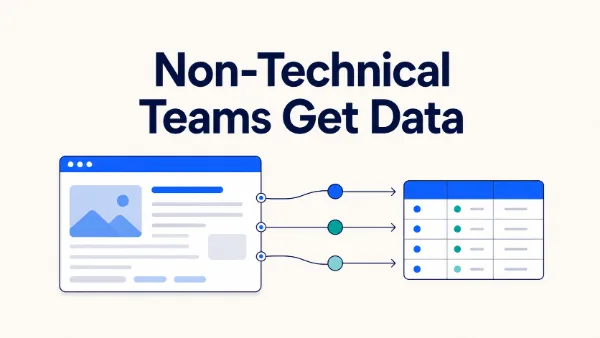
- The workflow layer stores results, compares snapshots, triggers alerts, and delivers reports.
Clawoxy’s Dedicated Scraping API documents Amazon product and marketplace extraction for approved public pages. Depending on the extractor and task, results can be returned as HTML, readable Markdown, or structured JSON. Explore Clawoxy’s Scraping API
Why connect AI to an Amazon scraping API?
An API can collect data. An AI model can analyze data. Connecting them creates a workflow that starts with a business question instead of a scraper script:
- Describe the research goal in plain language.
- Let AI turn the goal into a platform, page type, field list, and output specification.
- Send the request to the scraping API.
- Ask AI to check missing values, duplicates, and suspicious records.
- Generate a price comparison, product summary, review analysis, or competitor report.
This approach does not make the API unnecessary. It makes the API easier to use as part of a repeatable research process.
The three layers of an AI data-collection workflow
1. AI interprets the request
Business requests are rarely written in API language. A user might say:
Find highly rated products in a category, compare their prices, and summarize the main selling points.
AI can convert that request into a task specification:
- Platform: Amazon
- Page type: search results, category listings, product pages, or reviews
- Fields: title, price, rating, review count, product URL, and visible selling points
- Output: structured JSON
- Post-processing: deduplication, filtering, sorting, and summarization
The AI should clarify the request before the collection task starts. This prevents a common failure mode: collecting a large amount of data that does not answer the original business question.
2. The scraping API retrieves public data
The API handles the retrieval layer. Clawoxy’s public documentation describes Amazon page templates such as product details, search results, category listings, and reviews. It also describes a workflow based on selecting the platform and page type, configuring supported parameters, and connecting the response to a downstream system.
The documentation shows a task-creation endpoint:
https://data.clawoxy.com/v1/web-scraper/task/create
The exact authentication method, request fields, supported parameters, and response behavior should always be taken from the current API documentation. AI can draft a request or explain an example, but it should not invent credentials, permissions, or undocumented parameters.
3. AI turns results into usable insight
Once the API returns data, AI can help with the next layer of work:
- Normalize price formats while preserving the original price text.
- Flag missing or suspicious values.
- Identify duplicate product URLs or repeated records.
- Sort products by price, rating, or review count.
- Group recurring product claims and selling points.
- Classify themes in public review text.
- Produce a report that links each conclusion back to source records.
AI should identify uncertainty instead of filling gaps with guesses. Always preserve the source URL and collection timestamp so the analysis can be reviewed later.
A practical workflow: from one sentence to Amazon data
Step 1: Define the research question
Do not start with “scrape Amazon.” Start with a question that can guide field selection:
- Which category or product set should be monitored?
- Do you need product pages, search results, or public reviews?
- Is this a one-time research task or a recurring workflow?
- Which fields will influence the decision?
- Where should the result go next?
For example, this is more actionable than “collect wireless headphones”:
Collect public product titles, prices, ratings, review counts, and URLs for a defined wireless-headphones category in a selected Amazon marketplace, then compare pricing and visible selling points.
Step 2: Ask AI to create a task specification
You can ask an AI assistant to prepare a structured plan before making the API call:
Turn the following request into an Amazon public-data collection specification:
1. Marketplace and source
2. Page type
3. Required fields
4. Output format
5. Deduplication and validation rules
6. The analysis to run after collection

Do not add fields that the request does not require.
This makes the handoff between a human request, an AI assistant, and an API much easier to review.
Step 3: Send the specification to the scraping API
Use the API documentation to configure authentication, the Amazon extractor, the page template, supported parameters, and the desired output format.
For teams without a development background, the first connection can be set up with the documentation’s sample code, an API client, or an automation tool that supports HTTP requests. After the connection is configured, AI can help generate task descriptions and interpret returned data.
The API remains responsible for retrieval. AI remains responsible for planning and interpretation.
Step 4: Validate the response before analysis
A successful request does not automatically mean the dataset is ready for decision-making. Ask AI to check:
- Empty or duplicate product URLs.
- Missing or incorrectly formatted prices.
- Ratings outside the expected range.
- Review counts returned as text instead of numbers.
- Advertisements, recommendations, or duplicate listings mixed into results.
- Missing collection timestamps or source context.
Keep a separate list of records that require human review. Do not silently discard them or let AI infer what the missing value should have been.
Step 5: Generate the business output
After validation, AI can produce the final deliverable:
- A price-range overview and competitor shortlist.
- A comparison table for selected products.
- A summary of recurring selling points.
- Common themes in public reviews.
- A weekly or daily monitoring report.
- An alert when a tracked field changes.
Keep the raw JSON or exported dataset alongside the report. This creates an audit trail for important conclusions.
A reusable AI prompt template
The following prompt can be adapted to a product-research workflow:
You are an Amazon market-research assistant.

Task: analyze public product data returned by a scraping API.
Rules:
1. Use only the returned records. Do not add unsupported facts.
2. Preserve the source URL and collection timestamp.
3. Flag duplicate records, missing fields, and suspicious prices.
4. Normalize values for comparison while preserving the original text.
5. Output a data-quality summary, a competitor comparison table,
   key findings, and items requiring human review.
6. Make every conclusion traceable to one or more source records.
For recurring research, connect the scraping API, storage, AI analysis, and notification steps in an automation workflow. For example, a scheduled job can collect a defined set of public product pages, save each snapshot, and ask AI to create a report only when tracked fields change.
Benefits of adding AI to the workflow
Lower the barrier to entry
Users can begin with a business request and use AI to organize it into fields, page types, and validation rules. They do not have to think in selectors or page structure before they know what they are trying to measure.
Less manual cleanup and reporting
The API retrieves the records, while AI can normalize, classify, summarize, and explain them. This reduces repetitive copying, filtering, and report writing.
More consistent research across sources
When a workflow later expands to other public platforms, AI can help standardize task descriptions and output schemas. Platform support and parameters still need to be checked separately for each extractor.
Better connection to business decisions
The endpoint is not the end of the workflow. AI can turn returned data into competitor comparisons, product shortlists, price-change alerts, and market-research summaries.
Important limits and safeguards
AI-powered collection is not a license to skip validation or platform rules.
Before putting a workflow into production:
- Collect only public information you are permitted to use.
- Do not treat public product-page data as private seller-account data.
- Do not present an AI inference as an observed fact.
- Record source URLs, timestamps, field definitions, and failure states.
- Sample-check important fields such as price, rating, and review count.
- Confirm current pricing, quotas, concurrency, and supported platforms before launch.
Clawoxy positions its Scraping API around approved public pages and public-data workflows. The exact compliance requirements depend on the source, the use case, and the applicable terms. Review those requirements before collecting or redistributing data.
Conclusion
The strongest way to connect AI to an Amazon scraping API is to give each layer a focused responsibility:
- The scraping API retrieves supported public product and marketplace data.
- AI turns natural-language goals into fields, tasks, checks, and analysis.
- The surrounding workflow stores raw results and delivers verified insights to the team.
Start with one narrow question, such as monitoring visible price changes for a defined product set. Once the fields, output, and validation rules are stable, expand to more products, page types, marketplaces, or research questions.